
If your last IBM Sterling B2B Integrator security fixpack or an upgrade sat in a change-approval queue for more than a week, you don’t have a CI/CD pipeline. You have a deployment pipeline with a patching problem and a live CVE sitting on a system that talks to your trading partners every day it stays unapplied.
That’s not a knock on your team. It’s the predictable result of building Sterling automation the same way you’d automate any other application: Jenkins for the build, Ansible for the environment, Terraform for the infrastructure. Those tools were never the problem. The problem is that Sterling fixpack and security patch application the highest-risk, highest-consequence step in the whole lifecycle is usually the one part of the process still done by hand.
Ask yourself three questions:
- Do you know, right now, how many unpatched Sterling CVEs are open in your environment?
- If you rolled back your last fixpack, would your property file customizations – customer_overrides. properties, adapter and resource pool settings, JVM tuning – come back cleanly, or would someone need to manually reconstruct them from memory?
- Did your last “successful” deployment verify AS2 connectivity and EDI map integrity, or just that the server came back up?
If any of those gave you pause, this is the gap worth closing first – before the next audit, the next incident, or the next CVE with your company’s name near it in a post-mortem.
Why fixpacks break generic CI/CD assumptions
A standard pipeline treats deployment as a build artifact moving through environments: compile, test, promote, release. Sterling fixpacks don’t behave like application code. A single fixpack can touch the property layer, the underlying WebSphere or Liberty runtime, trading partner–facing services, and occasionally the database schema often more than one at once. Pipelines built purely around code promotion have no model for any of that, which is why so many “automated” Sterling environments still need a person to babysit the actual patch step, eyeball the logs, and judge by feel whether the environment came back up clean.
Three structural differences explain why, and why ignoring them guarantees manual intervention at the exact moment you can least afford it:
The real risk isn't your maps and BPs it's your property files
A pipeline that only tracks the binary has no record of what your property files looked like
beforehand, which is exactly how a rollback “succeeds” on paper while quietly leaving the environment mistuned. The pipeline must validate customer_overrides.properties, sandbox.cfg, adapter configuration and other properties impacted by the upgrades.
State matters more than the binary
Patching an instance with active in-flight transactions is a fundamentally different operation than patching an idle one. Skip transaction and you’re not automating a safe process you’re automating a shortcut.
Validation must be domain specific.
The app server started” is not the same signal as “AS2 still authenticates with this trading partner” or “this EDI map still parses a real inbound document without silently dropping data.” Generic health checks pass green while integrations break quietly underneath them.
What a production-safe fixpack pipeline looks like
A pipeline built to survive a real production rollout runs through four stages, each with a specific exit condition not a generic pass/fail flag:
- Detection and staging– Continuously polls IBM Fix Central and PSIRT bulletins against your current build, auto-staging any security-relevant fixpack into a lower environment the moment it’s released. No one must be watching for it.
- Pre-patch state validation– Confirms the environment is safe to patch by checking in-flight AS2/SFTP transfers and queue depth first. This is the step almost every “automated” process quietly skips.
- Patch application with property-file-aware rollback– Snapshots customer overrides. properties, sandbox.cfg, adapter configuration, and resource pool settings before the installer runs, since these are exactly what a fixpack installer tends to overwrite or reset. If a rollback is triggered, the pipeline restores the binary andreapplies the prior property file state as one step – instead of leaving someone to reconstruct custom settings from memory or an outdated wiki page.
- Domain-specific post-patch validation– Confirms AS2 MDN success, EDI map integrity, and downstream adapter connectivity before the deployment is ever marked complete.
For environments that can’t absorb any patch-window downtime, a canary pattern extends this further – routing a small slice of trading partner traffic to the patched instance before full cutover. It’s a bigger engineering lift than a standard staged deployment, and it earns its keep specifically in high-volume trading partner environments where even a short outage has a real dollar cost attached.
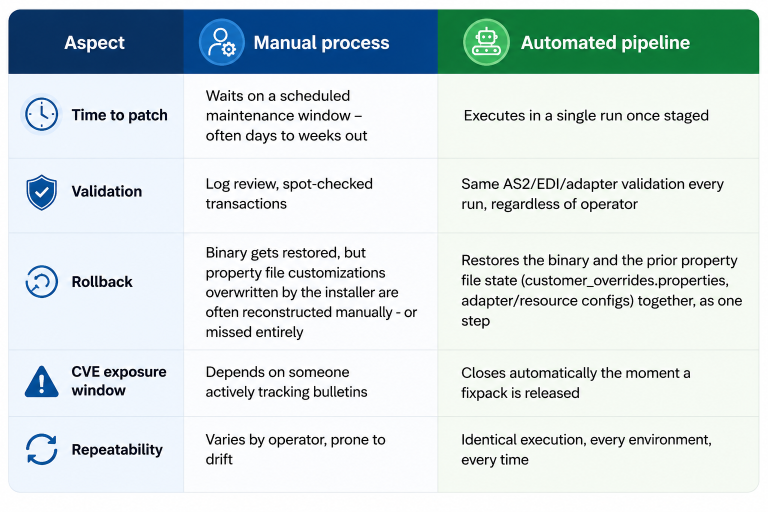
The pattern across every row is the same: automation doesn’t just make patching faster. It removes your exposure from depending on any one person remembering to act
Three ways a pipeline can look automated without actually being automated
Worth naming these, because all three are common and easy to miss in a maturity review:
Automation that stops before production.
If cutover to production still needs a human hand on the button, you’ve automated the easy 80% and left the highest-risk step exactly where it was.
Validation that’s really just “did it start.”
A binary pass/fail on server startup will report success on a deployment that silently broke trading partner connectivity underneath it.
No property file backup before patching.
Fixpacks can overwrite configuration files. Without a backup, rollbacks restore the binaries but leave custom settings missing or incorrect.
None of these are hypothetical failure modes they’re the predictable outcome of pointing a generic CI/CD template at a platform that was never generic to begin with.
Treating IQ and OQ as a standard, repeatable part of everySterling upgrade, rather than a one-off exercise, is what lets integration teams sign off on go-live with confidence instead of hope.
Where Pragma Edge fits
Pragma Edge builds Sterling B2B Integrator pipelines with property-file-aware rollback and domain-specific validation designed in from the start not a generic CI/CD template with Sterling bolted on afterward. As an IBM Gold Business Partner, this is the architecture our integration practice puts into every fixpack and security patch engagement we run.
Not sure where your own pipeline stands?We’ll run a free 30-minute Sterling Fixpack Readiness Review against your current environment and tell you, specifically, where your CVE exposure and rollback gaps are no obligation, no generic sales pitch.
Still patching Sterling manually? Talk to Pragma Edge about a pipeline that isn’t.