From Visual Data to Intelligent Decisions: How AI-Powered Visual Inspection Is Redefining Quality in Modern Manufacturing

Manufacturing quality processes are evolving as production environments become faster, more automated, and increasingly complex, traditional inspection methods are often challenged by speed, scale, and consistency requirements.

AI-powered visual inspection offers a practical way to enhance existing quality processes by transforming visual data into actionable insights. Instead of relying only on manual checks or sampling-based inspections, organizations can continuously monitor production outputs and identify issues earlier.

Solutions such as IBM Maximo Visual Inspection (MVI), combined with Pragma Edge’s integration expertise, help turn inspection from a standalone activity into an integrated part of operational workflows.

512 Select an element to maximize. Press ESC to cancel.

 
512 Select an element to maximize. Press ESC to cancel.
 
512 Select an element to maximize. Press ESC to cancel.
 

Quality Inspection Is Evolving

Manual inspection brings valuable expertise, but it can also introduce variability. Factors such as production speed, human fatigue, and limited sampling can make consistent monitoring difficult in high-volume environments.

AI visual inspection supports teams by:

  • Providing consistent analysis across production runs
  • Increasing inspection coverage beyond sample-based checks
  • Detecting potential issues earlier in the workflow
  • Supporting faster response through real-time insights

Rather than replacing human expertise, AI supports teams by enhancing visibility and reducing repetitive manual effort.
512 Select an element to maximize. Press ESC to cancel.
 
512 Select an element to maximize. Press ESC to cancel.
 
512 Select an element to maximize. Press ESC to cancel.
 
512 Select an element to maximize. Press ESC to cancel.
 
IBM Maximo Visual Inspection (MVI)

How AI Visual Inspection Works in Practice

Enterprise-ready solutions focus on simplifying AI adoption while maintaining flexibility.

512 Select an element to maximize. Press ESC to cancel.
 
512 Select an element to maximize. Press ESC to cancel.
 

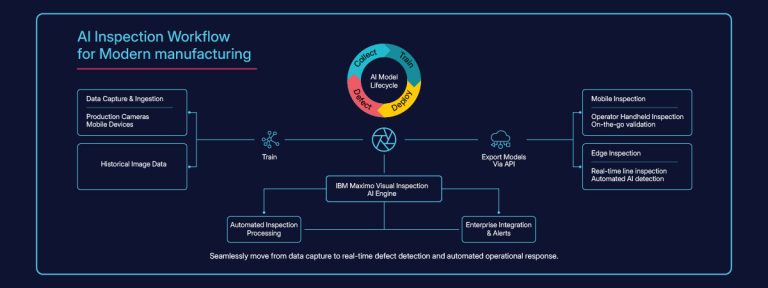
Capture

Images are collected using existing cameras, edge devices, or mobile applications.

512 Select an element to maximize. Press ESC to cancel.
 

Train

Teams label examples to help models learn patterns and identify anomalies.

512 Select an element to maximize. Press ESC to cancel.
 
512 Select an element to maximize. Press ESC to cancel.
 
512 Select an element to maximize. Press ESC to cancel.
 
512 Select an element to maximize. Press ESC to cancel.
 

Deploy

Models can run locally at the edge or within centralized environments depending on operational needs.

512 Select an element to maximize. Press ESC to cancel.
 
512 Select an element to maximize. Press ESC to cancel.
 

Detect

Real-time analysis enables faster identification of deviations or defects.

512 Select an element to maximize. Press ESC to cancel.
 
512 Select an element to maximize. Press ESC to cancel.
 
512 Select an element to maximize. Press ESC to cancel.
 
512 Select an element to maximize. Press ESC to cancel.
 
512 Select an element to maximize. Press ESC to cancel.
 

Integration Makes the Difference

AI inspection delivers greater value when connected with broader operational systems. Integration with MES, ERP, or asset management platforms allows inspection data to support meaningful actions instead of remaining isolated insights.
Pragma Edge helps align visual inspection initiatives with enterprise workflows, enabling inspection data to contribute to maintenance processes, reporting, and operational improvements.
This ensures that AI inspection becomes part of daily operations rather than a standalone experiment.

512 Select an element to maximize. Press ESC to cancel.
 
512 Select an element to maximize. Press ESC to cancel.
 
512 Select an element to maximize. Press ESC to cancel.
 
512 Select an element to maximize. Press ESC to cancel.
 
512 Select an element to maximize. Press ESC to cancel.
 
512 Select an element to maximize. Press ESC to cancel.
 

Practical Benefits Observed in Manufacturing Environments

Organizations adopting AI visual inspection often focus on improving consistency and operational visibility

512 Select an element to maximize. Press ESC to cancel.
 
512 Select an element to maximize. Press ESC to cancel.
 
512 Select an element to maximize. Press ESC to cancel.
 

Successful adoption typically follows a structured, phased approach:

  • Expanded inspection coverage
  • Faster identification of quality issues
  • Improved traceability and compliance
  • Reduced variability in inspection outcomes
512 Select an element to maximize. Press ESC to cancel.
 
512 Select an element to maximize. Press ESC to cancel.
 
512 Select an element to maximize. Press ESC to cancel.
 
512 Select an element to maximize. Press ESC to cancel.
 
512 Select an element to maximize. Press ESC to cancel.
 

The value lies not only in detecting defects but in enabling earlier and more informed decisions

512 Select an element to maximize. Press ESC to cancel.
 
512 Select an element to maximize. Press ESC to cancel.
 
512 Select an element to maximize. Press ESC to cancel.
 
512 Select an element to maximize. Press ESC to cancel.
 

Adoption Considerations

Introducing AI into quality workflows works best when approached incrementally:

  • Begin with clearly defined inspection use cases
  • Align deployment with existing operational systems
  • Monitor and refine models over time
  • Encourage collaboration between operational and technical teams
512 Select an element to maximize. Press ESC to cancel.
 
512 Select an element to maximize. Press ESC to cancel.
 
512 Select an element to maximize. Press ESC to cancel.
 
512 Select an element to maximize. Press ESC to cancel.
 
512 Select an element to maximize. Press ESC to cancel.
 

A phased approach helps maintain operational continuity while introducing new capabilities.

512 Select an element to maximize. Press ESC to cancel.
 
512 Select an element to maximize. Press ESC to cancel.
 
512 Select an element to maximize. Press ESC to cancel.
 
512 Select an element to maximize. Press ESC to cancel.
 
512 Select an element to maximize. Press ESC to cancel.
 

The Role of Pragma Edge

Pragma Edge supports implementation of IBM Maximo Visual Inspection by combining AI capabilities with enterprise integration experience. The focus is on ensuring that visual inspection aligns with operational goals and existing technology ecosystems.

512 Select an element to maximize. Press ESC to cancel.
 
512 Select an element to maximize. Press ESC to cancel.
 
512 Select an element to maximize. Press ESC to cancel.
 
512 Select an element to maximize. Press ESC to cancel.
 
512 Select an element to maximize. Press ESC to cancel.
 
512 Select an element to maximize. Press ESC to cancel.
 

Support typically includes:

  • Solution planning and architecture
  • Integration with enterprise platforms
  • Scalable deployment strategies
  • Continuous optimization
512 Select an element to maximize. Press ESC to cancel.
 
512 Select an element to maximize. Press ESC to cancel.
 
512 Select an element to maximize. Press ESC to cancel.
 
512 Select an element to maximize. Press ESC to cancel.
 
512 Select an element to maximize. Press ESC to cancel.
 
512 Select an element to maximize. Press ESC to cancel.
 
512 Select an element to maximize. Press ESC to cancel.
 

Moving Toward Intelligent Quality

Together, AI-driven inspection and enterprise integration enable organizations to move from reactive quality checks toward continuous, intelligence-driven operations.

512 Select an element to maximize. Press ESC to cancel.
 
512 Select an element to maximize. Press ESC to cancel.
 
512 Select an element to maximize. Press ESC to cancel.
 
512 Select an element to maximize. Press ESC to cancel.
 
512 Select an element to maximize. Press ESC to cancel.
 
512 Select an element to maximize. Press ESC to cancel.
 
512 Select an element to maximize. Press ESC to cancel.
 
512 Select an element to maximize. Press ESC to cancel.
 

Explore What Intelligent Visual Inspection Could Look Like for Your Operations.


512 Select an element to maximize. Press ESC to cancel.
 
512 Select an element to maximize. Press ESC to cancel.
 

Browse Categories

Share Blog Post

Pragma Edge (4.5/5)
Rated 4.5 out of 5

Previous Topic

Installing IBM Maximo APM - Asset Health Insights

Parent Topic

IBM Maximo Application Suite Overview

Next Topic

Thank you for submitting your details.

For more information, Download the PDF.

Thank you for registering for the conference ! Our team will confirm your registration shortly.

Invite and share the event with your colleagues 

IBM Partner Engagement Manager Standard

IBM Partner Engagement Manager Standard is the right solution
addressing the following business challenges

IBM Partner Engagement Manager Standard

IBM Partner Engagement Manager Standard is the right solution
addressing the following business challenges

IBM Partner Engagement Manager Standard

IBM Partner Engagement Manager Standard is the right solution
addressing the following business challenges

Pragma Edge - API Connect